AGS 3 and 4 · BS 5930 · AGS Guide to GI Reports
Ground investigation data, processed in minutes, not hours.
Drop in the AGS file, the logs, the Schedule 2 and the lab results. Strata Scope checks them, draws the plan, the logs, the sections and the graphs, and builds the factual report — so engineers spend their time on interpretation, not formatting.
Accounts are set up for you. Ask for access.
0.02.55.07.510.012.515.0
Data intake
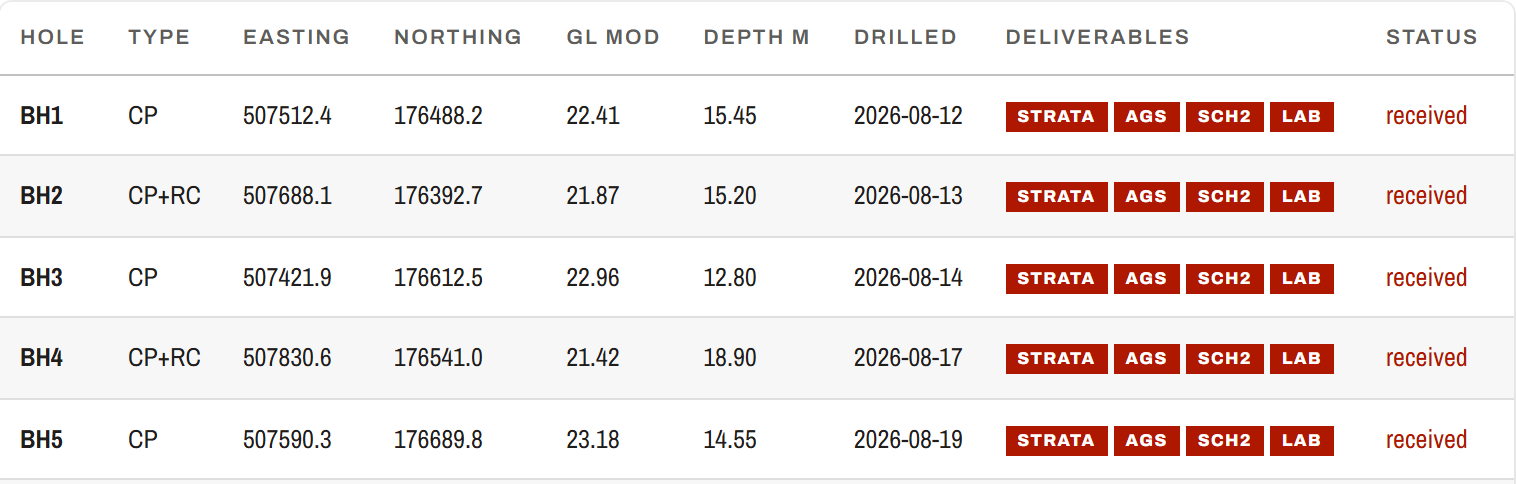
Borehole register
Site plan
Consolidated logs
Fences
Graphs
Testing schedule
Issue
LHR · R26023Demo contract — invented data
First pass, plainly stated.
Everything Strata Scope draws or writes is a first-pass suggestion for a competent engineer to verify. It is never a design value.
- Reads AGS 4
- Reads AGS 3 and 3.1
- Reads logs as PDF, scan or photo
- Reads Schedule 2 and lab results
- Writes Word factual report
- Writes Excel test graphs
- Describes to BS 5930
- Reports to AGS Guide to GI Reports
Features
Everything between the rig and the report.
One checked dataset drives every output. The register, the plan, the logs, the sections and the report all read the same holes.
Checks that catch it before the client does
Every AGS file is checked against the AGS rules, with a conformance report you can open from the register. A file that needs altering — a dropped digit in a coordinate, holes in two grids, overlapping strata — imports nothing until you have seen each change, before and after, and chosen.
- BH-03 · SAMP 4.50no test scheduled
- BH-07 · ISPT 12.00below hole depth
- 40 holespassed
Logs, read and consolidated
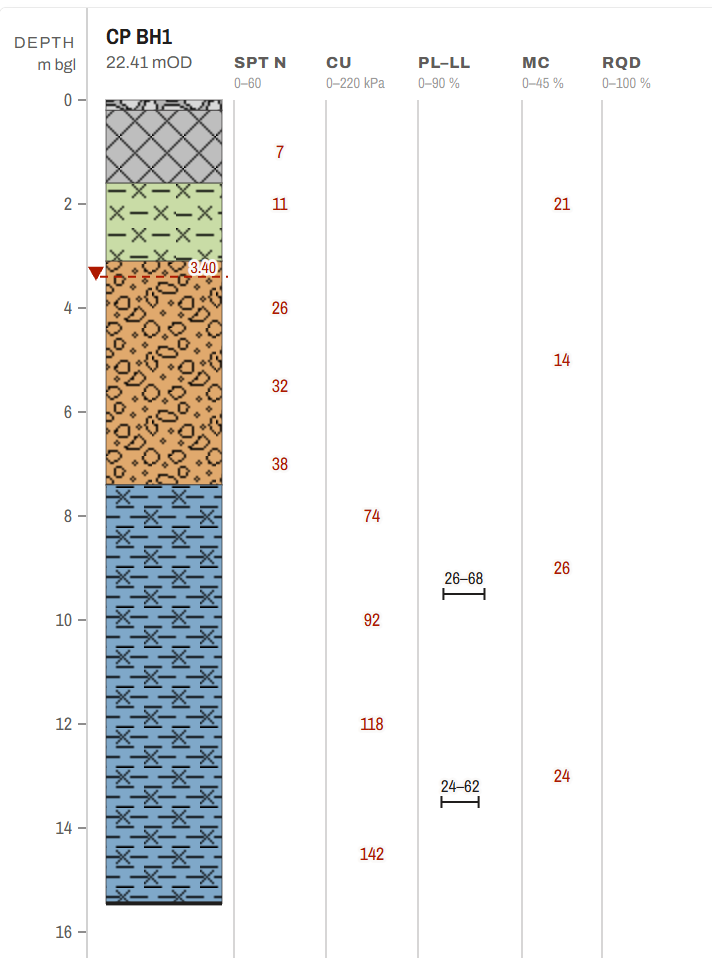
Strata coloured by named unit and hatched with the BGS ornaments, with SPT N, cu, moisture content and RQD printed as the value at the test depth. A log that only exists as a PDF, scan or photo is read, and every read value is marked as read.
Site plans and sections, drawn for you
Every hole on the plan with BS 5930 symbols. Draw a line between holes and read the section; north–south and east–west sections through every hole are drawn to start you off.
Lab results, plotted and reconciled
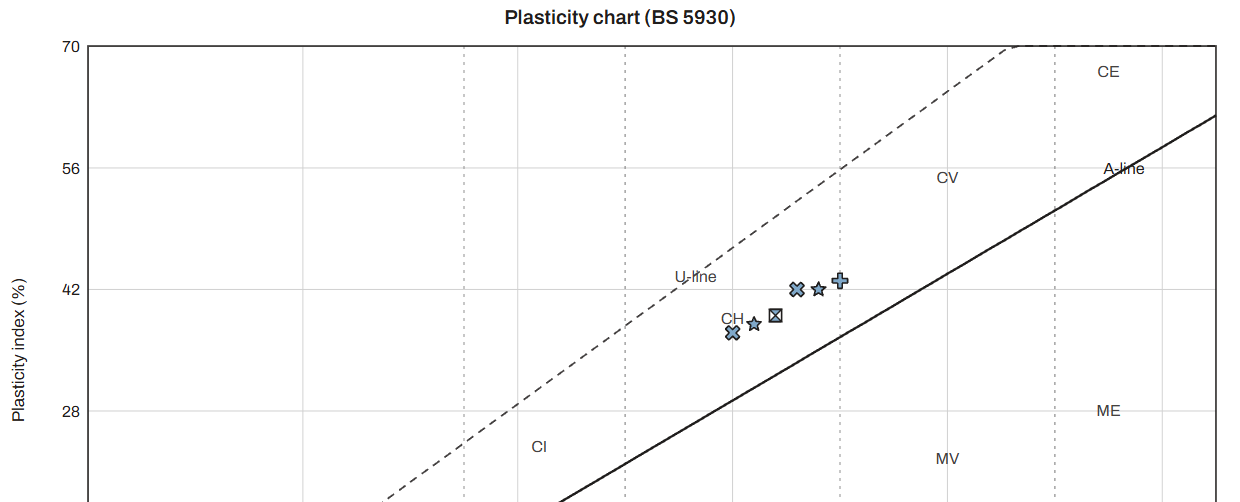
Plasticity chart and test results against depth, with an Excel workbook alongside. The lab schedule shows what was scheduled against what came back, sample by sample.
A factual report to the AGS Guide
Thirteen numbered sections and lettered appendices, built in Word from the data. Fields the tool cannot know print as a marker to complete before issue, never as plausible prose.
A desk study that runs itself
Once holes are located, the published geology and borehole records around the site are fetched from the British Geological Survey, or the Geological Survey of Northern Ireland, with their attribution, and filed with the job.
How it works
Three steps, from the rig's files to the client's copy.
Each job keeps its own record: its holes, schedules, lab results and issued documents stay together and apart from every other job.
- 01
Import
Drop in AGS files, borehole logs, the Schedule 2 and the laboratory results. A file can arrive on any screen.
- 02
Check
Read the register's counts and flags and the AGS conformance report. Every proposed repair is shown before it lands, and a derived value never looks like one the contractor supplied.
- 03
Issue
Generate the factual report, then issue it at a revision, P01, P02 and on. Nothing issued is ever overwritten: the client may be holding it.
Contractor and client
One job, two sides of the same data.
The contractor works the job. The client reads what has been shared with them, on the same drawings.
The contractor
The ground investigation team
- Data intake, register, plan, logs and sections
- Graphs and the lab testing schedule
- The factual report and the issue register
- Share a job with one named client
The client
The designer or consultant
- Progress against the Schedule 2
- The same site plan, with their own sections
- The issued documents, at their revisions
- Only the jobs shared with them, and nothing commercial
FAQ
Questions engineers ask first.
Which AGS versions does it read?
AGS 4, and AGS 3 and 3.1 files from older archives. Each file is checked for conformance, and the result is one click from the register.
Are the outputs design values?
No. Every output is a first-pass suggestion for a competent engineer to verify. Values read exactly from the AGS file, values the tool derived, and faults each carry their own colour, so the three cannot be mistaken.
What if I only have the logs as PDFs?
Strata Scope reads them: PDF, scan or photo. The read is held for you to check, and later reads add to the job rather than replacing it.
What does the client see?
Only a job the contractor has shared with them by name, and only what has been issued and published to them. Nothing priced ever reaches a client screen.
Where is my data stored?
Each job's files and records are kept on our own server, in [TO CONFIRM: hosting provider and region]. A log, lab sheet or core photograph you ask Strata Scope to read is sent, from the server, to Anthropic's model to be read; Anthropic does not train on it. The privacy notice, how we use AI and the sub-processor list say who receives what.
What is coming next?
A section for designers to bring their own drawings (DXF and shapefiles) under the holes, and access-track design, are in development.